Showing posts with label Symbian. Show all posts

Thursday, April 12, 2012

Nokia's Big Mistakes

Nokia is in trouble, so the media has been telling us. Well, we all know that. In fact many of us knew that things will only get much worse before it gets better. Cue shock faces.

Nokia is in trouble because they failed to adapt and continued to make mistakes. They believe they were a software company when they were only ever good as a hardware one. People bought Nokia phones because of the great design, not the silly OS it runs on. But behind the large pile of money and rose-tinted glasses, Nokia failed to see that and that is why they are in this pickle. Mistakes were made by all, from the old deposed regime to the new, from the management down to the grass roots.

Monday, April 11, 2011

Nokia E7 preview

Well here it is, the Nokia E7 - Nokia's newest Eseries flagship (soon to be dethroned by the Nokia E6) and the hire apparent to the Communicator series. In regards to Nokia's naming scheme, my views of the E7's naming scheme haven't changed since Nokia World 2010 when it was first officially unveiled and where I had my first hands-on.

The built quality is brilliant. I can find absolutely no faults with the hardware design and the materials used. It feels solid. The slider feels great and I found the AMOLED screen with Clear Black Display to be stunning. But I can't help thinking what I am seeing here as what was a Nseries smartphone rebadged as an Eseries because Nokia either could not get another Eseries out in time or felt that marketing this as a Nseries phone would remind people of the much hated Nokia N97.

The specs are typical Symbian^3 specs in that it runs on a ARM11 680 MHz processor, which isn't a big deal considering how optimised the OS is with in taking advantage of the GPU. The 256MB of RAM does seem lowly in comparison to most modern smartphone, and while Symbian^3 does not require much RAM, power users will likely encounter situations when background applications are forced to close due to insufficient RAM.

Like the Nokia N8, the E7 comes with HDMI out function which, coupled with the ability to play 720p videos, is useful. This is especially true when used with an application like Nokia Big Screen. It also has 16GB built-in storage. Unfortunately the E7 does not come with a external memory card slot, so the 16GB is all that users will ever get. This isn't a big deal for most users (even the Samsung Nexus S comes with only 16GB storage), but multimedia addicts will likely want to look elsewhere. The keyboard is pretty good, and an improvement over the one on the prototype. While it is only a four row keyboard, the keys are well spaced and provide good tactile feedback.

The camera on the E7 is the EDOF type. First seen on the Nokia E55, EDOF has spread like a virus onto every none-camera focused smartphone, which right now is everything apart from the N8. As I carry my own dedicated digital camera almost 99% of the time, I honestly could not care less what camera the E7 has (in fact I do not care what camera the N8 has!). However, because of the price, Nokia should have at least included a better camera with it. An autofocus camera with macro ability would also be useful for business users (you know, the typical Eseries users) who would want to scan documents and business cards.

I will be using the E7 for two weeks. Expect a review in the next couple of weeks. If there are any questions please ask away, either here or on my twitter account.

The Nokia E7 is available now for a sim-free price of £489.99.

Nokia gets even with HTC

HTC are holding a press event in London on 12 April. That's tomorrow. Nokia will also be holding a press event tomorrow, concerning Symbian. Do you know where I am going with this? Yes, Nokia is getting even with HTC for Nokia World 2010.

Just a reminder. At last year's Nokia World 2010, HTC and Nokia had a funny and very public spat in front of the world's technology press. Basically HTC sent a couple of coaches to Nokia World in order to ferry journalists to Central London for the HTC London press conference. In retaliation Nokia sent a couple of employees to 'picket' the event with Ovi Maps balloons and handing out Nokia lunch boxes with Ham, Tomato and Cheese sandwiches to the press outside.

So what will Nokia announce? Well I suspect (or hope) we will see a full preview of the long awaited revamped of Symbian UI. We will also see new device announcement in the form of a new E-series flagship, the E6 which replaces the successful E72, and X7.

In any case I will be at the HTC event. Expect a new Android flagship smartphone filled with features we do not need to be revealed. Follow my twitter stream for updates from the press conference.

Friday, March 11, 2011

Nokia N8 ad with new status bar and portrait Swype spotted

Well well well, what do we have here? What at first looked like an innocent advertisement for the Nokia N8 on Yahoo!, actually provided us with a sneak peak on some UI changes that will likely début with firmware PR 2.0 or PR 3.0. The image was tweaked to fit onto Yahoo!'s square ad format, but there is little mistaking what it shows.

First up, the ad featured Swype portrait QWERTY keyboard. This was always known to be coming, so it isn't anything new. The second is the new Symbian status bar. This is now slimmer than the original Symbian touch status bar which takes up more than double the space. It is not known if the new status bar will be available system wide or only within certain applications.

Hat tip to @macintosh for spotting this ad.

Thursday, March 3, 2011

WhatsApp review

Two days ago I wrote about how I paid £20 for six months of Pay As You Go mobile internet, and how I thought there are little reason in needing voice and text bundles. These days most of my communications are text based, with voice calls made mainly through Skype or a land line phone (we do need them for our broadband).

So what do I use as a SMS replacement. Normally I use direct messages via twitter, but not everyone is on twitter, particularly my friends in Asia. For those who aren't, I use WhatsApp. WhatsApp is a cheap instant messaging client not too dissimilar to RIM's BlackBerry Messenger service - only this allows for cross platform conversations. Because WhatsApp uses your data connection, it is also cheaper - particularly if you send a lot of international texts. The only issue is your friends will have to use WhatsApp as well, but this applies to all instant messaging client.

Feature wise, WhatsApp is limited to text messaging with no option for voice calling. WhatsApp's main advantage over competing instant messaging clients is it automatically scans your phone book and presents a list of contacts (including profile pictures) who are also using WhatsApp into the Favourite category. Obviously this doesn't mean you can merrily contact anyone on that list. They have to have you listed on their phone book as well before they can see you.

Starting a new chat is easy. Simply click on a contact's name and start typing in the input box. Chats are presented with a threaded view, and is far quicker than the default Nokia's Conversation application (what isn't?). You can also send images, videos, audio notes and your current location. Unfortunately I have not found a way to cancel an upload short of closing the application.

Anyway, within the chat area, you will also be able to see whether the contact is currently online, and here lies the biggest issue with WhatsApp: unlike text messages, a text can't be pushed towards the contact if he or she isn't online. Early versions of WhatsApp for Symbian has proven to be a battery hog, but I've had no batteries issues with the latest version.

Quirks aside, WhatsApp is a cheap way of getting people off an expensive text messaging plan. It is currently available for a one year free service for those on Symbian and Android, after that it only costs US$1.99 a year to subscribe to the service.

Whatsapp is available for iOS, Symbian, Android and Blackberry platforms.

Friday, February 11, 2011

Nokia embrace Windows Phone

Nokia today announced that they will be adopting Microsoft’s Windows Phone platform as their primary smartphone strategy. In an open letter by Nokia’s CEO Stephen Elop and Microsoft’s Steve Ballmer, Nokia and Microsoft announced plans for a strategic partnership to build a new global mobile ecosystem.

This, is a good thing.

See, I am a fan of Symbian, due to the flexibility and features it brings to power users. I also happen to like Windows Phone 7 a lot. I've always maintained that Windows Phone has a bright future, not in its current state, but after a couple of updates.

Not only that, Nokia will have a degree of control over Windows Phone platform. Microsoft currently have a strict requirement on hardware and software. A LG, Samsung and HTC Windows Phone 7 looks a like and has almost nothing to differentiate between all of them. Not with Nokia. With Windows Phone, Nokia will be able to change almost anything with Windows Phone, including the UI - though the won't as this will likely break app compatibility.

I also admire Stephen Elop's attitude. It takes a lot of guts to create so much disruption when Nokia is still top of the industry. He, I believe, is the right person to lead Nokia out of the deep hole their former regime (OPK and Anssi) dug themselves into.

Wednesday, January 12, 2011

Gravity for Symbian review

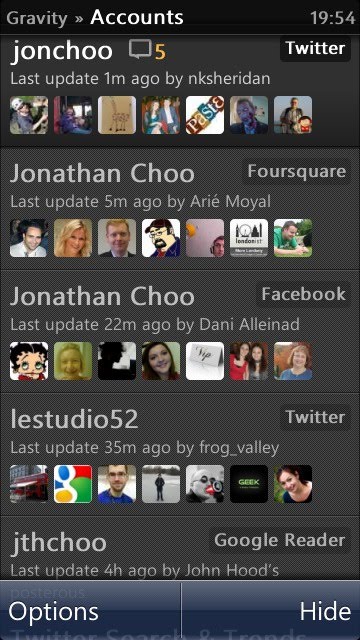
Gravity is a rarity among Symbian applications. It has a UI that not only looks good, but also works great. It is fast and comes with massive loads of features. What started out as a simply Twitter client, the sole developer at Mobileways.de has implemented support for Google Reader, Foursquare, Facebook and the open source StatusNet, with varying degree of success.


Considering how backwards Symbian is supposed to be (according to American blogs anyway), and how there are virtually zero competition on the platform, the number of features on Gravity is quite a feat. The sheer number of features, it's stableness and speed, easily makes Gravity one of the best mobile social network clients on any platform. And I say that with a straight face.

At a time when Nokia is urging developers to code in 'code once, deploy everywhere' Qt, Gravity is still reassuringly native. I've nothing against Qt, but so far none of the Qt based applications I've seen has convinced me it is better than native. Gravity is compatible with S60v3 and all modern Symbian touchscreen devices from Samsung's abandoned at birth Omnia HD to Sony Ericsson's cute Vivaz and Nokia's 'flagship' N8.


Let's begin with Twitter, as this is what Gravity was designed for. Gravity has almost all the features that I could ever want from a mobile Twitter client. It supports both native and old-style retweets, geolocation tagging of tweets, follow/unfollow, direct message (with threaded UI), the creation and management of lists, uploading images to popular image sharing sites (TwitPic, Flickr etc.), alert, multiple accounts, draft and schedule posts, homescreen widget, notification (in both screensaver on Symbian^3 devices, as well as audible/vibration) and much more.

There are a couple of features I would like to see added. For example an alert when someone follows, filters and the ability to open URLs to Opera Mobile rather than Symbian's native Web browser. Speaking of URLs, you can also set Gravity to save URLs to Instapaper and other services to read it later, a useful alternative to using the favourites function to bookmark posts to read later.


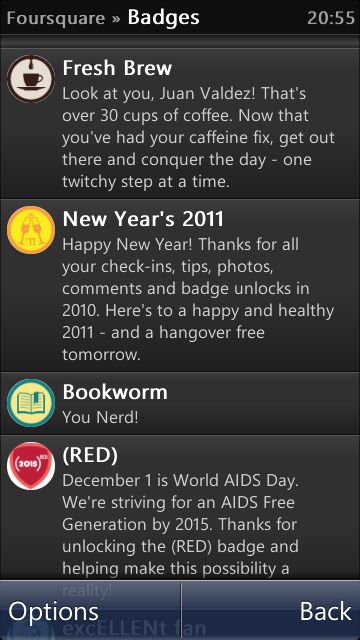
The Foursquare client is as basic as it goes. It only allows check-ins and shouts (to Twitter and/or Facebook - provided you have your Foursquare account is linked to them). There are no supports for leaving and viewing tips, nor is the ability to delete previous check-ins from the history present.

The most curious absence is the lack of Specials, a Foursquare feature that allows participants to reward check-ins to users, so don't go deleting that amateurish official Foursquare Symbian client just yet. Having said that if all you want to do is check-in or shout, Gravity is perfect.


If you are a Facebook user, you will be pleased to know that Gravity supports pretty much most of the important features of Mark Zuckerberg's Friendster rip-off, including Messages (in threaded conversation view), notifications (no friend requests here), News Feed and Status Updates, including replies. It isn't a Facebook mobile client replacement, offering even less than Facebook's touchscreen mobile website. But it is indispensable if all you want is a quick glance on what your Facebook friends are up to, post a status update or reply.

A built-in RSS reader in the form of Google Reader is the next major feature of Gravity worth writing about. This is pretty basic, but at least it has all the essential functions one would normally need form a newsreader software. Like the Twitter bit of Gravity, URLs can be posted to Delicious or added to Instapaper or Read-it-Later. There is an option to easily tweet the post as well.


In an age of 99p mobile apps, Gravity isn't cheap (£8 via the Ovi Store), and that's before taking into account the amount of good freeware social network clients you can get on competing platforms like Android and iOS. But if you have a Symbian phone, and you need a powerful Twitter application then Gravity is your answer. You could do a lot worse with £8 anyway.

I also have a relatively modern Android phone (with around ten Twitter clients installed!), and my girlfriend has an iPod Touch 4G which she tethers wirelessly to her ageing Nokia none-touch smartphone, and both of us always fall back to Gravity simply because we both think it is the most effective mobile Twitter application available on any mobile platforms.

Wednesday, January 5, 2011

Nokia Big Screen with Nokia N8 and Wii Remote

Nokia Beta Labs today announced the availability of Nokia Big Screen for Symbian^3 devices with HDMI-out (currently only the Nokia N8 supports this, with the E7 not due out for a couple of weeks).

Symbian^3 with HDMI-out ports already allow users to watch videos, pictures and play music on their HD telly, but the mobile orientated UI is far from suitable for media consumption. With Nokia Big Screen, the application presents the user with a UI that is designed from the ground up to take advantage of a large HD screen (up to 720p). The phone's screen will double as a remote, with a layout similar to a TV remote. But even then that isn't ideal.

In comes the Wii remote (and other Bluetooth enabled devices like keyboard). In the case of Nintendo's waggle device, just activate the Wiimote's Bluetooth pairing mode by pressing the red button at the back (or press the 1+2 buttons which I forgot...). The buttons works as they should: A for select, B for back and the Home key takes you right back to the front.

It isn't perfect though, but then this is merely a proof of concept app by their Beta Labs department. I would like to see bigger fonts, as well as support for folder/sorting support (what's with Nokia and their refusal to support folders with picture viewing apps?) and proper 720p support (images are still displayed at what I believe is VGA resolution).

Wednesday, December 8, 2010

Skype now compatible with Nokia N8 and other Symbian^3 devices

They sure took their time, but hei, at least it is here and before Christmas too. Skype is now compatible with Symbian^3 - that means it will work on the Nokia N8, C6-01, C7 and E7 devices. As yet, I've not encountered any issues with the app but it's barely been a day. Now, give us video calling and I'll be happy.

To download and enjoy free calls on your phone, point your mobile browser to m.skype.com

Sunday, December 5, 2010

Games for your Nokia N8

All of these games are compatible with Nokia's Symbian^3 phones (N8, C6-01, C7, E7). If some of them aren't showing on your mobile's Ovi Store, well good for you. Go buy a PSP instead.

Angry Birds by Rovio

This delightful hit iPhone game is now on Symbian^3 (as well as every gaming platform on earth). Though it costs more, has less levels (more are promised with free updates) and lacks achievements, it is still a fun puzzle game that deserves your attention. It didn't sell millions for nothing. For the uninitiated (all seven of you), Angry Birds's gameplay revolves around using a catapult to fire birds (of different abilities) at evil green pigs in their fortresses. Fun? Yes it is.

8/10

Real Football 2010 HD by Gameloft

If there ever was a game that highlights the disadvantages of touchscreen only devices for gaming, this is it. Controls are unwieldy, it's like trying to drive a Formula One car fitted with a tractor engine. Visuals are ugly, and the commentary gets annoying after the first few seconds. Even the original FIFA was better, and that was released 17 years ago. Dear developers (not you Gameloft): for goodness sake, just give me Sensible Soccer!

2/10

Hero of Sparta HD by Gameloft

Gameloft is on a roll here with bad games (is it surprising? they've been making bad games since I can remember). Sticking a HD suffix on it doesn't help. This God of War rip-off is so bad, it is probably what Kratos dreams of when he has a nightmare. Sorry, but it is shit. I don't care if it costs only £3, it is still money wasted on something that is an insult to modern gaming,

2/10

Need for Speed: Shift HD by EA

This is one of the better games on Symbian^3. The visuals are pretty good (though no where near PSP level), though I do wish for higher framerate for smoother gameplay. Unfortunately as with all touchscreen games, NFS:Shift HD (stop it with the HD suffix - it isn't HD, none of these games are!) suffers from the lack of physical keys, but it isn't too bad either. With assisted braking turned on, it is far from atrocious. Not that I would recommend playing this despiteit being free on the N8's Ovi Store.

5/10

Bounce Boing Battle by Rovio

Boune Boing Battle is a Symbian^1 game, but that shouldn't put you off. It is one of the few games that the developers has designed the game around a phone and its features rather than trying to shoehorn a traditional game into a mobile touchscreen device. It is a two player affair, so you must have a second player with another touchscreen Bluetooth phone to play with. Basically you try to bounce the ball back at them by drawing a wall on the screen for it to bounce off. Simples. It doesn't offer much else (hei it is a tech demo). But then again it is free and I've no complaints about that.

7/10

Wednesday, November 10, 2010

Nokia N8 USB On-The-Go

The Nokia N8 features a unique feature (to Symbian at least) called USB On-The-Go. USB OTG basically allows users to plug USB devices such as flash drives and, with enough power, portable hard drives into their mobile device, in this case the N8.

What this means is that owners of the N8 have easy access to their files on other external drives without the need to use a PC. Users can also use the N8 to charge any devices that accepts USB charging, although I don't see any reason for doing so. Unfortunately the N8's USB OTG function does not seem to recognise any of my mouse (a VAIO wired and Logitech wireless).

My lovely VOIP Sony VAIO mouse isn't supported

A storage device like this thumb drive will work just fine

The N8 had no issue recognising my four year old Samsung YP-U1Q DAP

I honestly thought this would work, but the N8 refuses to play nice with the PSP :(

Similarly it threw a hissy fit when connected to a M2 card reader

Not surprising - a portable hard drive like this will need to be connected to an external power supply first

Saturday, September 25, 2010

Nokia N8 impressions

I recently had a couple of hands-on with Nokia's new Symbian^3 'flagship' device, the N8, at Nokia World 2010. I wasn't planning on writing this, as I spent way too little time with the display devices and was overwhelmed by my other times with the E7, C6-01, C7, X3, X2 and the new HTC Desire Z and HD.

But on Monday I happened to be at #LeStudio52 and had a chance to play around with Julien Fourgeaud's N8 running on pre-production none-release firmware, which he recently won in an Orange tech competition. It was nice to be given the chance to spend a little bit more time with it and this time without all the usual crowds you get at Nokia World.

The unique and sleek metal body of the N8 just scream quality. It feels great in my palms, and definitely feels and look like the premium device it is. The battery is none-removable, but a couple of N8 owners I talked to reckoned that it could last about a day on the none-removable 1200mAh battery.

The OLED screen is lovely and matches AdonisDemon's HTC Desire in colour saturation and has the same wide viewing angle as you can see from the comparison side-by-side pictures I've taken (note: the HTC Desire's brightness is set to maximum and the N8 was at 50%). The HTC Desire obviously trumps the N8's screen in terms of resolution.

Powering the Nokia N8 is Symbian^3. As far as I know Symbian^4 will not be made available on this device, so take that into consideration when considering the N8. The UI feels and operates much like Symbian^1, but is far quicker no thanks to OS optimisation, quicker processor and the removal of double taps. Gallery and web has pinch to zoom feature and suffered from very little slowdown in rendering.

The N8 was able to play 720p video files with no problems. We've had no issues playing 720p .mkv files. This is great news as the N8 features HDMI out, which works really well as demonstrated at Nokia World. Angry Birds on a HDMI telly? No problem!

The Nokia N8 is due out next month. You can pre-order it here.


Tuesday, April 27, 2010

Nokia N8 announced

Nokia today announced the N8, the first Symbian^3 (skipping ^2 altogether) smartphone and the first Symbian touchscreen N-series phone that does not have a slide out keyboard. It features a monoblock design with a 3.5" capacitive screen dominating the front.

The big news here obviously is the 12MP camera with larger sensor. Personally I feel that no matter how big Nokia claims the sensor to be, 12MP is just too much. The law of physics dictate that. 8MP with the same sensor size would have been better, and you probably wouldn't have to rely on a puny flash (xenon or otherwise) for low light photography. Oh well numbers and buzz words do sell.

Fortunately the numbers elsewhere are more useful - it has 16GB of built-in storage and is expandable via the microSDHC card slot. The camera also supports 720p HD video capturing.

It weighs 135g, so it isn't too heavy. The rest of the specs are pretty standard: WiFi 802.11b/g/n, GPS with A-GPS, HSDPA, 3.5mm headphone socket with TV-out, FM radio with RDS and FM transmitter and micro USB. Also new to a Nokia phone is the HDMI out port, allowing users to view HD video on a HD ready telly, as well as the newest Bluetooth 3.0 revision. The processor isn't the same slow one as the one in the N97/N97 Mini, instead it has been bumped up to 680Mhz. Not what I was hoping for, but still a decent enough speed. It has 256MB RAM.

There's the same widget based homescreen that made its debut on the N97 - this I hope can be turned off, but I highly doubt so. Sadly widgets are all the rage now despite being resource killers.

So all in all, the N8 looks good on paper and has a rather lovely design (particularly the orange version). €370/£320 is pretty darn decent too, undercutting plenty of lesser phones. But I may not be getting one. Why you ask? First it feels like a stop-gap phone before the real flagship hits next year running Symbian^4. Second, I want to see what sort of high-end E-series Nokia has plans for (they really are better built). Finally, I want a slider version with 4/5 row keyboard instead.

Make it happen Nokia.

Update: You'll find untouched sample photo shots from the N8's camera here and a HD video recording here. The image quality is certainly impressive.

Tuesday, April 13, 2010

Nokia E5 stylish QWERTY phone for the masses


Nokia today announced two new Symbian messaging phones, the E5 and C6. The C6 is a slider style touchscreen device with a four row QWERTY keyboard running Symbian^1 (Why not Symbian^3? I am guessing Nokia is reserving that for the rumoured N8). Sadly it still features the same 434Mhz processor that bogged down the N97 and N97 Mini...

More exciting (to me at least) is the cheaper E5 with front facing QWERTY keypad, the successor to the E63. The E5 features a design style lifted straight out of Palm's Treo 500 and Centro smartphones. For such a cheap phone, the specs is actually pretty decent. Despite running on a puny BL-4D 1200mAh battery with the same 600Mhz ARM11 processor that powers the E55 and E72 and more RAM (256MB to be precise), it has a claimed talk time of 18.5 hours and a standby time of 29 days (obviously under ideal conditions). Whatever Nokia did with the power management - I want that! At 13mm it is a pretty thin phone and is overall slimmer than the portly E63.

The QVGA display is disappointing in this year (or indeed any of the past couple of years), but at that price we can all forgive it. A 5 megapixel camera (based on EDoF technology that graced the E55) with LED flash will probably be sufficient for most people, while the standard 3.5mm headphone socket will appeal to those who wishes to use their own headphones. Its connectivity CV includes quad-band GSM, tri-band WCDMA 3G with 10.2 Mbps HSDPA, WLAN, Bluetooth and its own built-in GPS receiver for free navigation with Ovi Maps. Not bad for €180.

Best of all it runs on the mature none-touchscreen S60v3 FP2 Symbian OS 9.3 smartphone platform. Despite the somewhat 'outdated' platform erroneously labelled by a couple of patriotic American bloggers as not so smart, Nokia has continued tweaking the UI. The active standby screen has been overhauled with features similar to the one that appeared on the 5630 XpressMusic, 5730 XpressMusic and 6700 Slide. It seems to be very useful and I do wish that Nokia would backport the feature onto older but currently available phones like my E55.

I was talking to my brother the other day and he wanted a new messaging phone with front facing QWERTY keypad that isn't too pricey. Well here it is here. If Nokia can release this soon then they will have at least one additional sale.

Tuesday, April 6, 2010

Ovi Maps 3.3 with free navigation review

About 2 1/2 months ago Nokia announced that they will be making its turn by turn voice navigation service on Ovi Maps for free and sure enough version 3.3 (3.03) soon turn up and allowed just that. I've been using the version for a couple of weeks now, chiefly on my E55, and have been very pleased with the experience. It is available for a number of modern Nokia Symbian devices with built-in GPS receiver.

Firstly, this service is available in 76 countries and will tie in nicely with their already available offline feature. The offline feature is brilliant as it allows the user to freely download maps from 180 countries through a desktop terminal thus saving on over the air data costs. If you wish you can also download maps as you go. Map tiles will be saved to the memory card so you would not have to redownload the area again. It also includes free traffic updates and premium content from Lonely Planet and Michelin.


The user interface has changed somewhat from previous versions. I initially had my doubts on new interface, which was clearly designed for touchscreen users, but soon got used to it. I still prefer the previous version as the UI then was designed for hardware soft key phones like the E55, and work faster than this new grid based UI. Still it works fine, but I do still wish that it would boot straight to the map rather than the menu.

Numerous keypad-based shortcuts exists that will make your life easier especially now that they've removed many of the functions from the menu. Pressing '5' for example will disable/enable the digital compass if your device supports it. '*' and '#' respectively controls the zooming.


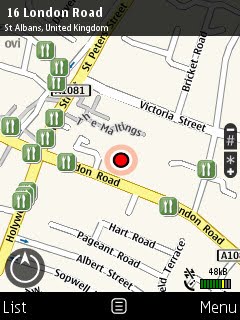
With Ovi Maps 3.3 and above, Nokia has integrated their 'Here and Now' service, so far consisting of only two widget-like apps: Weather and Events. Both are rather good, though seems to be rather slow (they are web-based after all). The service is still patchy - for example Events suggested the Cineworld Luton, a good 9.5 miles away from here (St. Albans), when there is a Vue much nearer in Watford. Similarly there is no such listings from events hosted at the local Maltings Art theatre and Abbey Theatre.


The Lonely Planet and ViaMichelin premium guides fared much better, though the suggestions of places to eat within St. Albans is rather limited. It is understandable for a small village, but with a population of 65k, St. Albans is hardly a small village. I mean we have two railway stations serving this town for goodness sake.

In any case the listings are accurate and more importantly, seems to be based on quality. You won't find any crappy chain stuff here (not even the good ones like Pizza Express).


The search engine has been simplified dramatically. A search field exists for both addresses (including support for full seven characters UK postcodes) and POIs (where you will find the chain stuff like Pizza Express), with no seperate fields for annoying stuff like house numbers and counties.

Using it is easy - just type in and a second or two later the screen will be populated with suggestions, sorted by distance. Scroll to the desired entry and press the left soft key will bring up the map showing the entry or use the centre d-pad key to bring up a list of handy options allowing the user to use the entry for navigational purpose or even to call any phone numbers associated with that entry.


The rest of Ovi Maps 3.3 works pretty much the same as previous version. You can adjust the route calculating algorithm with options like avoiding the motorway, tunnel, ferry, toll road, unpaved road and trains. Similarly it can also suggest route optimised for pedestrians. Route suggestions seems to be fairly good, though this is merely based on my personal experience and opinion. I can't test the quality for the whole UK now can I?

Like other popular SatNav products (such as TomTom), you can change the screen to 'night' mode which works better on the eyes. GPS lock is almost instantaneous if A-GPS is activated. It takes about 5 seconds for a cold lock and less than a second for a warm lock. Impressive, but this has got to do more with the device hardware and firmware than the application itself.


Nokia is under no obligation make its navigation service for free, period - especially to older models for which this feature was never promised upon. But for those with compatible Symbian phones (those with built-in GPS receiver), this update is not something to be missed. All in all, this is easily the best smartphone routing application I have used - even without the free navigation. It is even capable of replacing dedicated satnav particularly if pair it with a touchscreen device with larger screen. Best of all, minus the cost of the device, it won't even cost you a penny.

Ovi Maps with free navigation is available for Nokia N97, N97 mini, N86 8MP, 5800 XM, 5800 Navigation, X6 16GB, X6 32GB, E52, E55, E66, E71, E72, 5230, 6710 Navigator and 6730 classic.

For those without compatible devices, Ovi Maps navigation license is available for less than 10 euros a year, still much better value than the majority of mobile routing applications.